Alice Hahn
Selected Work

This work is protected.

Enter the password,
or ask Alice for one.

Incorrect password. Try again.
Stealth startup · B2B software Building AI Workflow InsightsAI Workflow Insights
Stealth startup · B2B softwareStealth startup Next project
Building AI Workflow Insights for Teams

Designing a product from zero, then changing how we
built it.

I joined as the only designer, before the company had a full-time engineering team. I shaped the product with the founder from early strategy to 1.0, the first milestone for users to test. As the team grew, I moved my handoff from static Figma files to Claude Design prototypes, and started updating the design system directly in code.

Outcome
Handed off a 1.0 ready to build from and ready for users to test.
Role
Product Designer · Sole designer
Team
Founder, Product, Eng, ML
My focus
Idea → build-ready 1.0
Every run, captured
A summary of every workflow run across all teams. Captures the last 4 weeks and the current week.
Total runs
1,342
Active workflow time
241h 06m
People
6
Workflow groups by domain
Sales
4 workflows
1186 runs
Customer support
2 workflows
104 runs
Finance
3 workflows
52 runs
Top 5 tools used
ERP
162 runs
Email
131 runs
Spreadsheets
52 runs
Chat
31 runs
Bank portal
19 runs
Workflows (9)
WorkflowDomainPeopleActivityRuns
Order intake
Inbound customer order to confirmed order in the ERP
Sales
NIRT
236
Shipment status check
Customer asks about a shipment; status sent back
Sales
NIRT+5
97
Return requests
Sort inbound returns and route them to the right desk
Customer support
RI
31
01 · The starting point

An idea, a lot of conversations, and no product yet.

The founder had an idea and conversations with the people he wanted to build for.

The idea: software that shadows how a company's work really gets done, then shows leadership where to improve it.

As he hired the team, I explored what the product could be through design concepts. We went a lot of directions before one stuck.

02 · What I owned

I owned design from the first concept to our
1.0 milestone.

Direction and concept demo
Explored many directions as design concepts and helped the team choose one. Mapped the story for the concept demo that tested it with prospects.
Onboarding and desktop app
Designed how people install it and approve the permissions that let it shadow their work, then the tray app and widget for Windows and macOS.
Web dashboards and chat
Took the workflow library, the analytics, and the assistant chat from first concept to handoff, with interactive views to slice, filter, and compare.
Design system
Designed the component library in Figma on the shadcn kit, so engineering could build from it.
03 · Key decisions

Four calls that shaped the product.

Call 1

Who is this for?

The person doing the work, or the people running the team? I mocked up both, a personal assistant and a company-wide tool. Users told the founder the value was at the team level, so we built that first and saved individual control for later.

Runs
23
last 4 weeks + current
Median run time
14m 44s
typical run
Run time range
6m – 27m
shortest to longest
People
4
run this workflow
People
Who runs this workflow, how often, and how long it takes them.
PersonTotal runsRuns/weekMedian run time
NNora71.48m 04s
TTheo61.224m 49s
IIsha51.014m 44s
RRemy51.019m 06s
Where we landed. A whole team in one view.
Call 2

Show it before we build it

I mapped the story, then worked with the founder and a creative video agency to turn it into two rounds of concept demos, made before the product existed. Prospects' reactions confirmed the team direction and shaped the build.

1. Demo 2 Journey mapped
  1. Step 1: Open the command center, pick a session
  2. Step 2: Review one session: summary, errors, video
  3. Step 3: Open the artifacts it created
  4. Step 4: A purchase order: where the flow begins
  5. Step 5: Flag artifacts from a team not yet in Signal
  6. Step 6: Zoom out to the whole organization
  7. Step 7: Back to the session: invite the missing teammate
  8. Invite path
  9. Invite path, Teammate gets an invite email
  10. Invite path, They join and allow shadowing
  11. Invite path, Signal fills in the gaps
  12. Step 8: Graph: locked workflows are blurred
  13. Step 9: Filter to Accounts Receivable
  14. Step 10: See which session fed this workflow
  15. Step 11: Back to the graph: workflows now connected
  16. Step 12: The command center at scale, with errors flagged
Swipe to see the full map
2. Concept screens from both demos
SSignal
Command Center
Search or filter
Last 7 days
ACCOUNTING (3)ERRORS ONLY (72)PURCHASING (5)
Metrics at a Glance
84%
Workflows completed on time
+4% vs last week
5
Improvements over the last 7 days
+1% vs last week
29%
Rework rate
+3% vs last week
16%
Issues per workflow
+4% vs last week
Average Duration by Workflow
Highlights workflows that take the longest
Invoice Processing
38 minutes
Purchase Order Entry
35 minutes
Payment Approval
31 minutes
Reconciliation
26 minutes
Order Entry
24 minutes
Booking
21 minutes
Workflow Error Types
Errors that add the most to process inefficiency.
Data validationLatencyManual entrySystem issues
Bottlenecks and Errors Trends
Error rates alongside process bottlenecks to highlight workflow slowdowns
Mon 05/11
Tue 05/12
Wed 05/13
Thu 05/14
Fri 05/15
Sat 05/16
ErrorsBottlenecks
SSignal
Highlights and Suggestions
Training Insights
Find skill gaps and areas to improve from workflow patterns. Use them to guide targeted team training.
Keyboard shortcut adoption
Low usage among 7 high-volume users. Potential 9-11% speed gain after training.
LatencyOrder entriesPurchasingSalesAccounting
Spreadsheet formula gap
4 team members fall behind on formula-based tasks. Offer an advanced spreadsheet workshop.
LatencyReportingAccountingFinance
Cross-team handoff training
12% of workflow errors come from misaligned data handoffs. Run joint data management sessions.
Order entriesInvoicingAccountingSalesPurchasing
Reduce Errors
Improve workflow efficiency by finding and fixing common errors.
Improve data entry accuracy
1 in 3 recorded issues starts with an invalid or incomplete form. Add guided input fields to cut errors.
Manual entry errorsOrder entriesSalesPurchasing
Unify data across teams
Inconsistent field names between Purchasing and Sales cause mismatches and manual rework.
Manual entry errorsData entrySalesPurchasing
Minimize system downtime impact
Several tasks fail when systems go offline at peak times. Add backup scheduling to keep work moving.
System issuesLatencyOperationsOffline
SSignal
Search
New chat
Chats
Order intake review
Weekly ops summary
Insights
Projects
Library
Repository
Timeline
Transcripts
InsightsLibrary
Search or filter...
05/14/2026
All users
All device IDs
Sort: Most recent
No active filters
Daily Insights
Thursday, May 14, 2026|Total sessions: 8
Export
54
Total sessions
Active sessions now: 17
286
Total sessions this month
Active session days: 14
9
Active devices
–
5
Flagged sessions
Review now
The Highlights
Operations are steady, but a 19% dip in data entry accuracy points to a training gap on the finance team. Fixing it could prevent an estimated $38K in rework this week.
Data entry accuracy down 19% todayCRITICAL
Flagged across 612 order entry sessions. Review recommended.
Go to sessions
3 reps with 2+ flagged sessions this weekNEEDS REVIEW
May need coaching. Concentrated in the invoice processing workflow.
Go to sessions
Invoice processing up 14% since yesterdayHIGH VOLUME
$46.2K in POs completed, the highest single day this month across 17 sessions.
Go to sessions
Ask AI about today
SSignal
Search
New chat
Chats
Order intake review
Weekly ops summary
Insights
Projects
Library
Repository
Timeline
Transcripts
Library
GridList
05/14/2026
All users
Last 4 hours
Search or filter...
Total sessions: 60
WorkflowStream
COMPLETE
PO approval · Northwind Supply Co.
No issues
May 14, 8:12 AM18m 40s
NoraNK4821 | DEV-5413
FAILED
Invoice match · Harbor & Pine LLC
Stock mismatchRework
May 14, 8:26 AM24m 05s
JonasJW2290 | DEV-6120
COMPLETE
Shipping routing · Bluefield Trading
Manual entry
May 14, 8:41 AM12m 52s
IshaIR3317 | DEV-4471
COMPLETE
Pricelist update · Cedar Row Partners
No issues
May 14, 9:03 AM9m 18s
TheoTN1184 | DEV-5530
PROCESSING
Sales order entry · Juniper & Co.
Manual entry
May 14, 9:15 AM15m 27s
MiraML5562 | DEV-7092
COMPLETE
Credit hold review · Maple Lane Group
Waiting on reply
May 14, 9:34 AM31m 10s
RemyRA7392 | DEV-9283
COMPLETE
Inventory count · Oakmont Industries
Rework
May 14, 9:52 AM21m 44s
NoraNK4821 | DEV-5413
COMPLETE
PO approval · Riverside Supply
No issues
May 14, 10:08 AM16m 03s
IshaIR3317 | DEV-4471
Previous
1
2
3
…
8
Next
SSignal
Search
New chat
Chats
Order intake review
Weekly ops summary
Insights
Projects
Library
Repository
Timeline
Transcripts
LibraryPO approval · Harbor & Pine LLC
PO approval · Harbor & Pine LLC
Frame 8
03:12
16:48
Frames8 of 25
F5
F6
F7
F8
F9
F10
F11
F12
Steps
00:00
F 1-3Open purchase order
Jonas opens the create PO screen from the ERP menu. The header and line grid load empty, and he confirms the document type.
01:20
F 4-7Vendor lookup & entry
He enters the vendor ID. The ERP fills in the vendor name, payment terms (Net 30), and currency.
03:12
F 8-14Save attempt
Jonas saves after entering 11 line items. A stock mismatch flag appears on item 004: the system count doesn't match the invoice.
04:05
F 15-18Manual correction
He opens item 004 and changes the quantity from 40 to 38 to match the scanned invoice. The flag clears.
SSignal
Search
New chat
Chats
Order intake review
Weekly ops summary
Insights
Projects
Library
Repository
Timeline
Transcripts
Timeline
ListTimeline
06/12/2026
8:00 AM
1 hour
Search or filter...
Total workflows: 42
WorkflowStream
6 AM8 AM10 AM12 PM2 PM4 PM6 PM
NKNora K.
NK4821 | DEV-5413
JLJonas L.
JL207 | DEV-5056
MPMira P.
MP9930 | DEV-1468
TDTheo D.
TD514 | DEV-4961
IMIsha M.
IM1049 | DEV-7364
RARemy A.
RA7392 | DEV-9283
Previous
1
2
3
Next
{{ carPos }} · {{ carCaption }}
Call 3

One run sets the standard

The team landed on a benchmark together: the most efficient run becomes the standard. I designed how every other run is measured against it.

Compare runs
Two runs on one shared clock.
04m8m12m16m20m24m
NoraThe standardORD-004 · Wed Mar 4 · 9:20 AM · 9 stepsOpen run
Open
Build
Ship
Submit
TheoORD-007 · Wed Mar 4 · 1:15 PM · 26m 40s · 5 off standardOpen run
Open
Build
Ship
Submit
On standardExtra workLooped backSkipped
Call 4

Recommendations before automation

The long-term vision was automated tasks, but that was far off, so we started with recommendations. At first the data pipeline wasn't ready, so we worked with sample data, and our front end used Gemini to show it working in production. Once the ML team had the pipeline stable, the LLM powered the insights and the chat.

Where it evolved: answers, not just suggestions
Library›Sales›Sales order entry
Sales order entry
Enter a customer order in the ERP and send the confirmation
OverviewRunsStandardActivity
Runs
23
last 4 weeks + current
Median run time
14m 44s
typical run
Adherence
78%
to the standard run
People
6
ran it this month
PersonRunsMedianAdherence
MMira611m 52s91%
IIsha513m 20s84%
NNora414m 05s80%
JJonas315m 41s72%
TTheo318m 10s64%
RRemy221m 33s58%
StartedRunDurationPerson
Today · 9:42amSO-24871 · Dispute11m 04sIIsha
Today · 11:15amSO-24876 · Credit hold26m 18sTTheo
Today · 2:30pmSO-24890 · New vendor16m 47sJJonas
Summarize today's run×
Summarize today's runs
SSignal

There were 14 runs today across 5 people and 6 workflows. Overall it was a smooth day: 12 runs finished cleanly and 2 were interrupted.

Runs by workflow today
Dispute invoice resolution4
Credit hold review3
Order entry3
Month-end close2
Vendor onboarding2
Fastest run. Isha closed INV-4502 in 11 min, 40% faster than her usual dispute run, by skipping the manual spreadsheet lookup.
Interrupted. Theo's credit hold review paused for 52 min waiting on a reply, and Mira's order entry stopped when the ERP timed out.
New pattern. Jonas started copying vendor details from email straight into the ticketing tool. That's a step the current workflow doesn't include.
With the LLM in place, the chat answers what people ask, with charts, ranked data, and insights in the reply.
04 · How the work changed

Static frames stopped being the deliverable.

The team moved to VS Code and Claude Code, so I moved my design work from Figma into Claude Design to match. My handoff became a prototype with real interactions, and our engineer could push it straight to code. That meant less design QA.
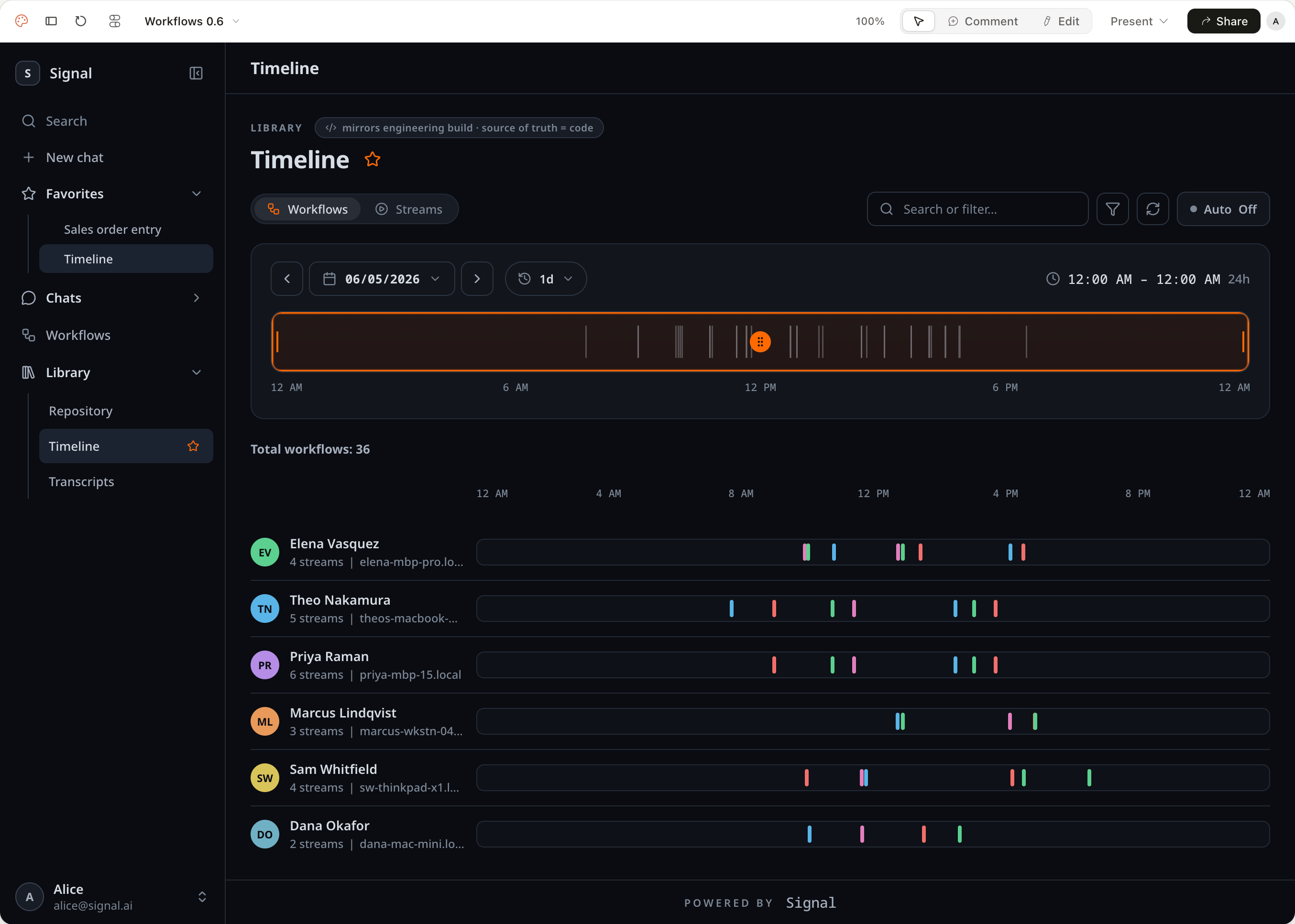
The Timeline prototype inside Claude Design, with the Claude Design toolbar visible
Recreated what was live
I could quickly recreate what was in production, so the team reacted to one accurate picture and our direction talks got tighter.
Got the team aligned
Before 1.0, the product owner ran a workshop where product and engineering sketched ideas. I held design sessions after to understand their thinking, then set the direction.
05 · Design system in code

I started shipping design system code myself.

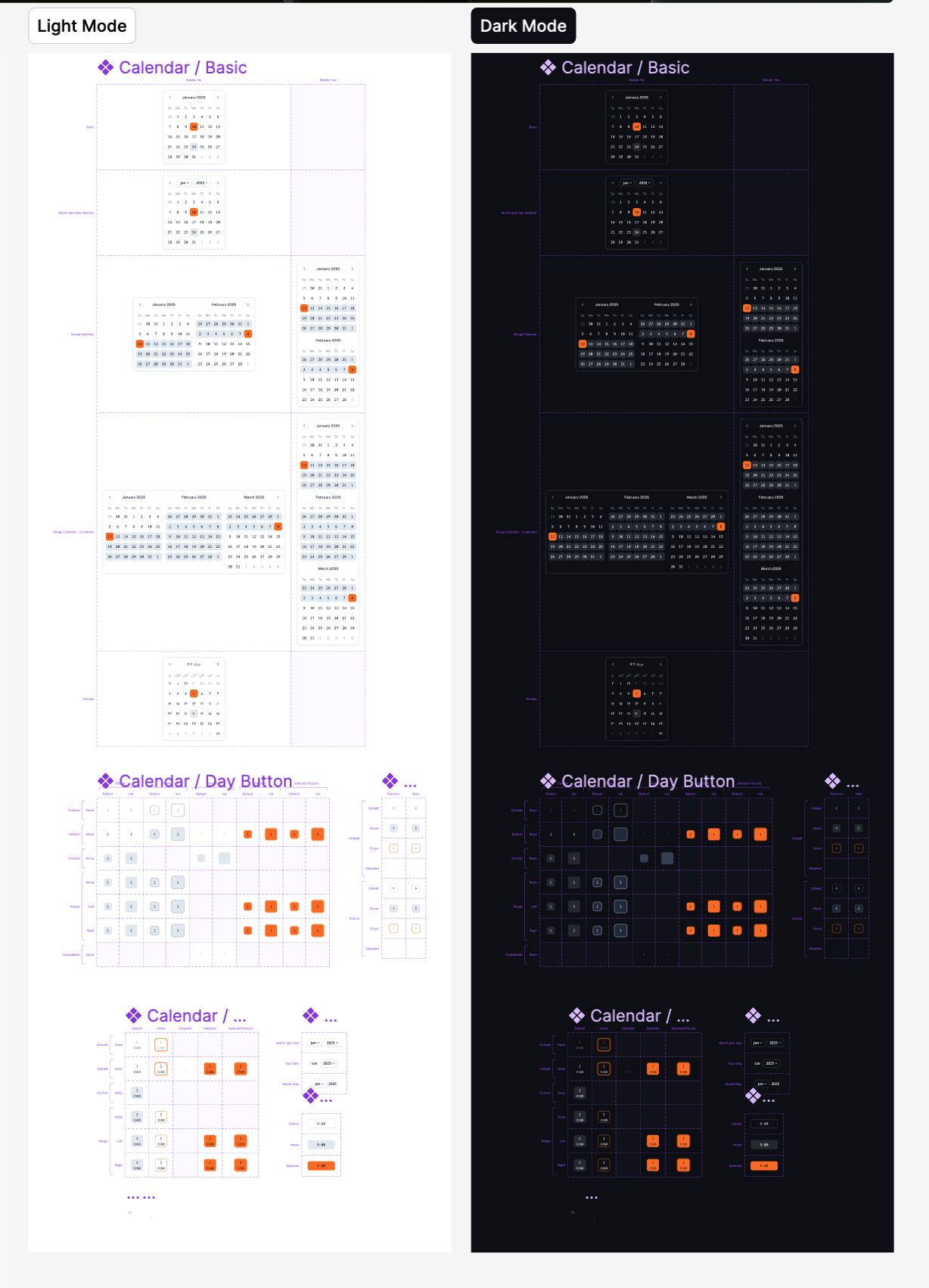
Our engineer built the design system in code from my Figma. Moving fast left some hard-coded values and foundation tokens that needed cleanup. So I went into Claude Code to audit and refactor them, then kept the components current as the designs changed. Engineering stayed on feature work.
Audit tokens
→
Refactor
→
Update components
→
Code review
→
Deploy
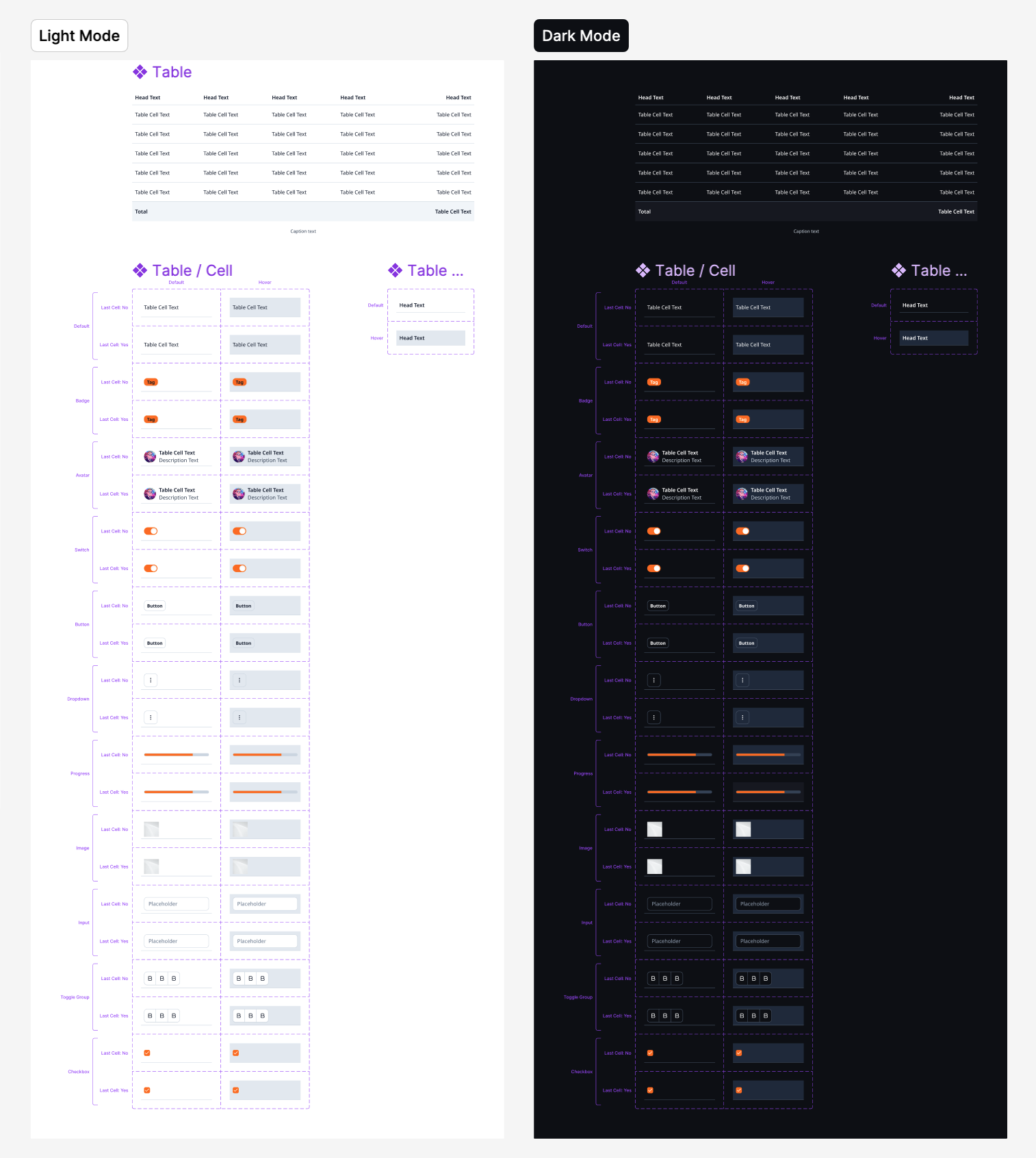
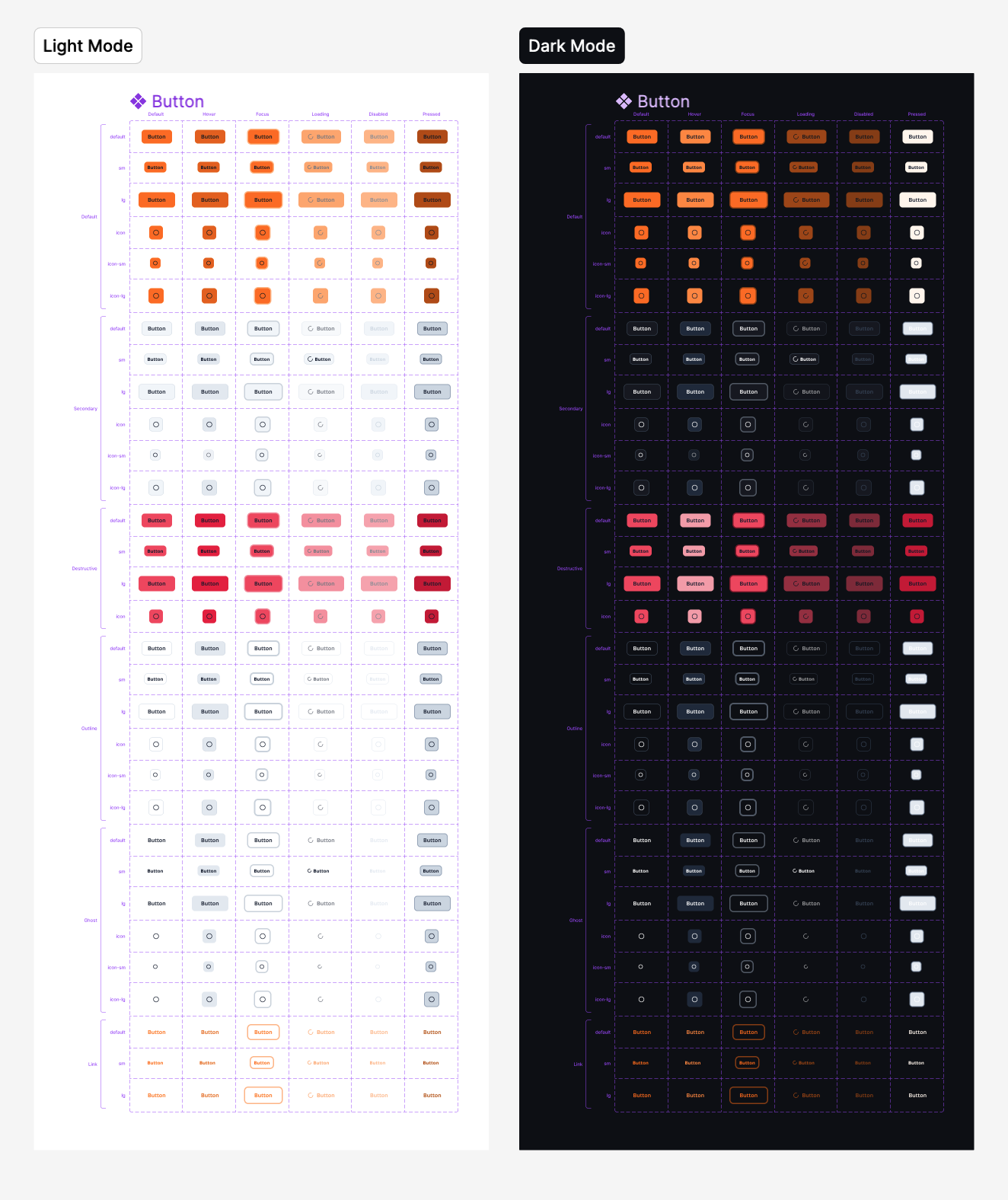
The component library, designed in Figma
COMPONENTS (READY FOR DEV) · 42
Accordion
Avatar
Banner
Breadcrumb
Button
Button Group
Calendar
Card
Checkbox
Combobox
Context Menu
Date Picker
Modals
Divider
Drawer
Dropdown Menu
Empty State
Field
Floating Action Button
Form
Hover Card
Input
Input Group
Item
Kbd
Loading State
Menu
Pagination
Popover
Progress
Resize
Radio
Sidebar
Select
Slider
Switch
Table
Button components in FigmaCalendar component in FigmaTable component in Figma
Built on shadcn and expanded. Light and dark, with all states.
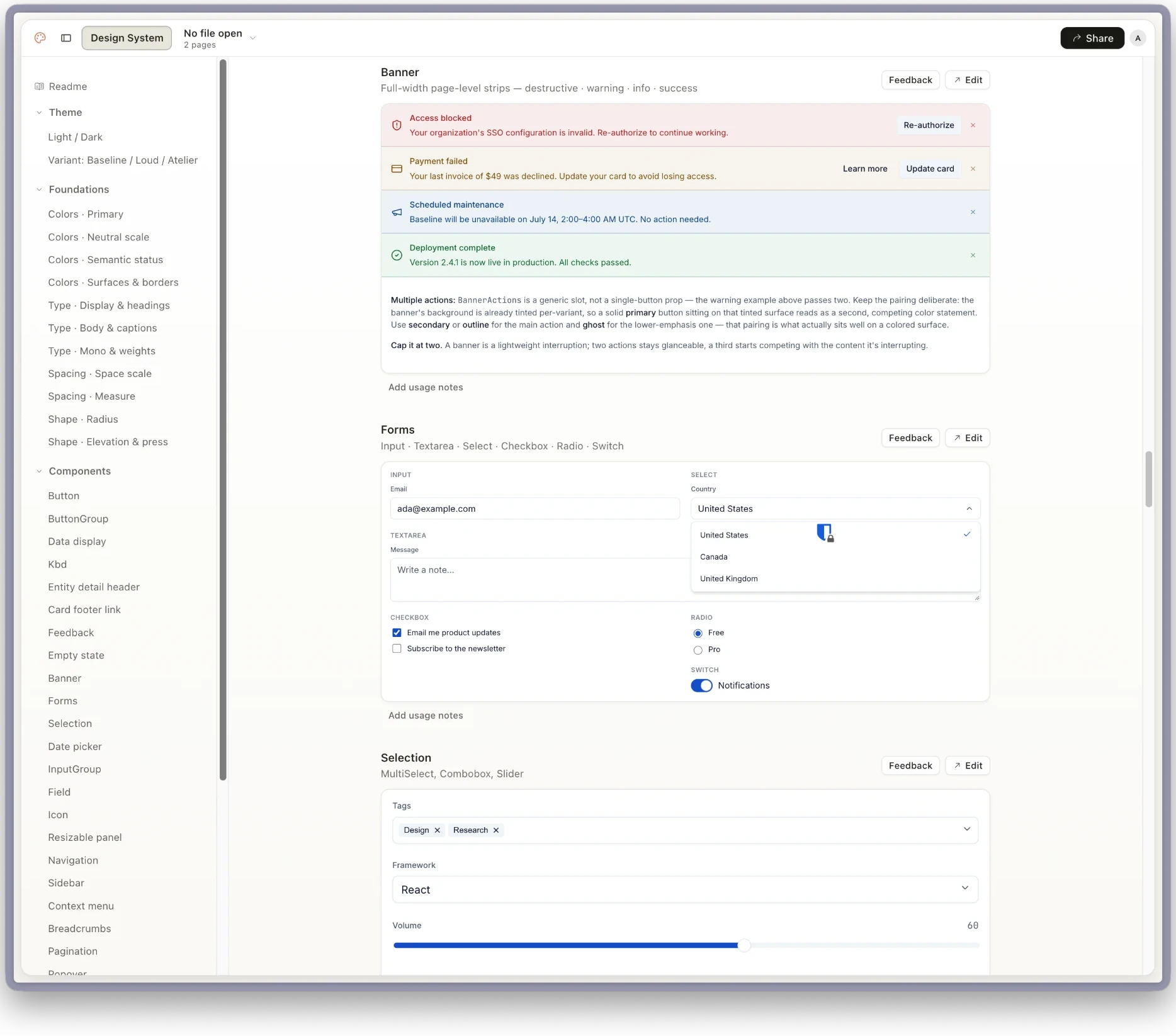
The design system, moved into Claude Design
The design system library inside Claude Design
06 · Handoff & reflection

I handed off a 1.0 engineering could ship from.

My last deliverable was the design for 1.0, the first milestone for users to test. It carried the newest work, the dashboards and data views, and mirrored what engineering had already built from Figma. The team took it from there.

Outcome

1.0 went to the team ready to build from and ready for users to test.

Reflection

Rebuilding the product as a working prototype changed our conversations.
We spent less time explaining the design and more time deciding on it.

Building AI Workflow InsightsProduct design case study
{{ fabIcon }} {{ fabLabel }}