Selected Work

This work is protected.

Enter the password,
or ask Alice for one.

Your access has expired. Email Alice for an updated password.
Incorrect password. Try again.
Toast · Identity & Permissions Making permissions easier to set up and trust
Toast · Identity & PermissionsToast More case studies →
Toast · Identity & permissionsREDESIGN

Making permissions easier
to set up, and to trust.

Toast's customers range from small restaurants to enterprise groups. As senior product designer on a newly formed platform team, I led design and research to rethink how restaurants set up job roles, employees and permissions.

Role
Senior product designer, leading design and research, with a lead engineer and a product manager.
Outcome
Defined the permissions strategy and set direction for self-service permissions: from small restaurants to enterprise.
toastA Little Restaurant - Santa Monica
These are the jobs we listed based on your relationship with West Coast Group.
You can add or remove any job role as well as edit the job role title and permissions for your restaurant location.
Corporate
Director of OperationsCorporate
Salary | $--
24 Permissions
East Coast Group, West Coast Group
›
+Add Job
A Little Restaurant - Santa Monica
OwnerManagement
Salary | $--
21 Permissions
West Coast Group
›
General ManagerManagement
Salary | $--
18 Permissions
West Coast Group
›
Skip for nowContinue
01 · Context

A new team, to make permissions make sense.

Toast built a new identity team to take on platform work: user identity and permissions across the product ecosystem. I joined as a senior product designer. Before we could dive deep into permissions, the team did preliminary identity work around login, including integrating Okta. Restaurants run on permissions: who can clock in, change a menu, apply a discount or see wages.

02 · What I owned

Leading design and research.

I led product design and research for the team. I worked with the lead engineer and the product manager to define the product strategy, scope the work, and communicate the vision to stakeholders.

Partway through, our product manager left and a new one joined. I brought them up to speed and kept the work and its momentum moving.

03 · Research

Listening across the whole customer lifecycle.

We started with internal research, talking to team members who are stakeholders or who touch the customer journey as it relates to permissions setup. That was 17 people, from the first sales conversation through to supporting restaurants that are live.

Reseller enablement manager
Value-added reseller manager
Director, solutions engineering
Director, enterprise solutions engineering
Enterprise solutions engineer
Customer success program manager
Discovery · 6
Manager, software configuration team
Remote implementation engineer
Senior enablement manager, field
Regional implementation manager
Onboarding · 4
Restaurant success manager
Senior director, customer support (Tier I)
Technical support manager (Tier II)
Live · 4
Product development · 3, across all stages
Product marketing manager, competition
Senior director of product management
Associate director of product management
Who we talked to: 17 people across discovery, onboarding and live, plus product development.

Then we talked with customers. We started with small business customers with multiple locations in moderated research sessions, then followed up with mid-market and enterprise customers to see whether the pain points were the same. We asked how they felt about onboarding, specifically setting up job roles, employees and permissions.

“Overall, onboarding could be more clear”
Customers wanted a timeline or breakdown of what to focus on, including permissions setup.
A “do it yourself” approach to learning
Encouraged by the team, but customers were mixed on how comfortable they were with it.
“Permissions setup is the easiest part”
Straightforward, and the most intuitive part of onboarding.
“I guess I don’t understand permissions”
Setup is easy, but customers had to troubleshoot later to learn whether they had set it up right.
“I wish I had web access earlier”
Customers wanted to explore and get tasks done before go-live, so they were better prepared.
“More that’s put in front of me before go-live that I didn’t think about… 100% it would be great.”
Customer, on getting setup right

The research gave us a shared picture of the customer. I shared the pain points with the product team and with cross-disciplinary teams across the company, so everyone could see the experience from the customer’s side.

04 · Insights

Easy to set up, hard to understand.

Across the research, permissions setup was the easiest part of onboarding, and also the part customers least understood. They couldn’t tell whether they had set it up right until something went wrong. Four themes held up across small multi-location and mid-market customers.

1
Give me granularity
Customers want more granular control of permissions.
2
Different levels of access
Make it clear that you can only see yourself, or the people below you.
3
A high-level view
A way to see permission sets across employees, like in a table.
4
Remove duplicate work
Make it easy to copy restaurant data, like job roles, to other locations.

What we heard, and the quick wins

What we heard most
  • Granularity in permissions, which matters most for mid-market and larger customers
  • Add, edit and delete abilities
  • Clock in as the job role, not with every permission combined
  • Editing a location after it’s been applied
  • An audit log, and a “who has what access?” report
  • More tooltips and context
Quick wins
  • Permissions content in training
  • More robust documentation examples
  • More context in tooltips and workflows
  • An import template for employee data
  • A pay rate column in bulk job setup
  • Easier navigation when editing across locations

Who we were designing for

To align the team, I created proto-personas for the permissions ecosystem. They’re based on what we think we know, so we treated them as a work in progress until we were confident in who the customer is.

SO
SMB · Quick service
Owner
“Help me get up and running so I can focus on what I love to do”
Set up a lot alone and didn’t get it. Employees call support to find out what they can’t access.
SC
SMB · Full service
Controller
“Help me get comfortable so we can grow to more locations”
Unsure what to allow, and restaurant groups don’t make sense since a third location opened.
MD
Mid-market · Full service
Director of Operations
“Help me expand the business while staying stable and secure”
Adding locations is hard, and changes can’t be edited later, so they start over.
EA
Enterprise · Quick service
Business Administrator
“Help me stay on top and continue to be the best in the industry”
Needs granularity and an enterprise-level view across groups and franchises.
05 · Principles & ideas

Four principles to organize the ideas.

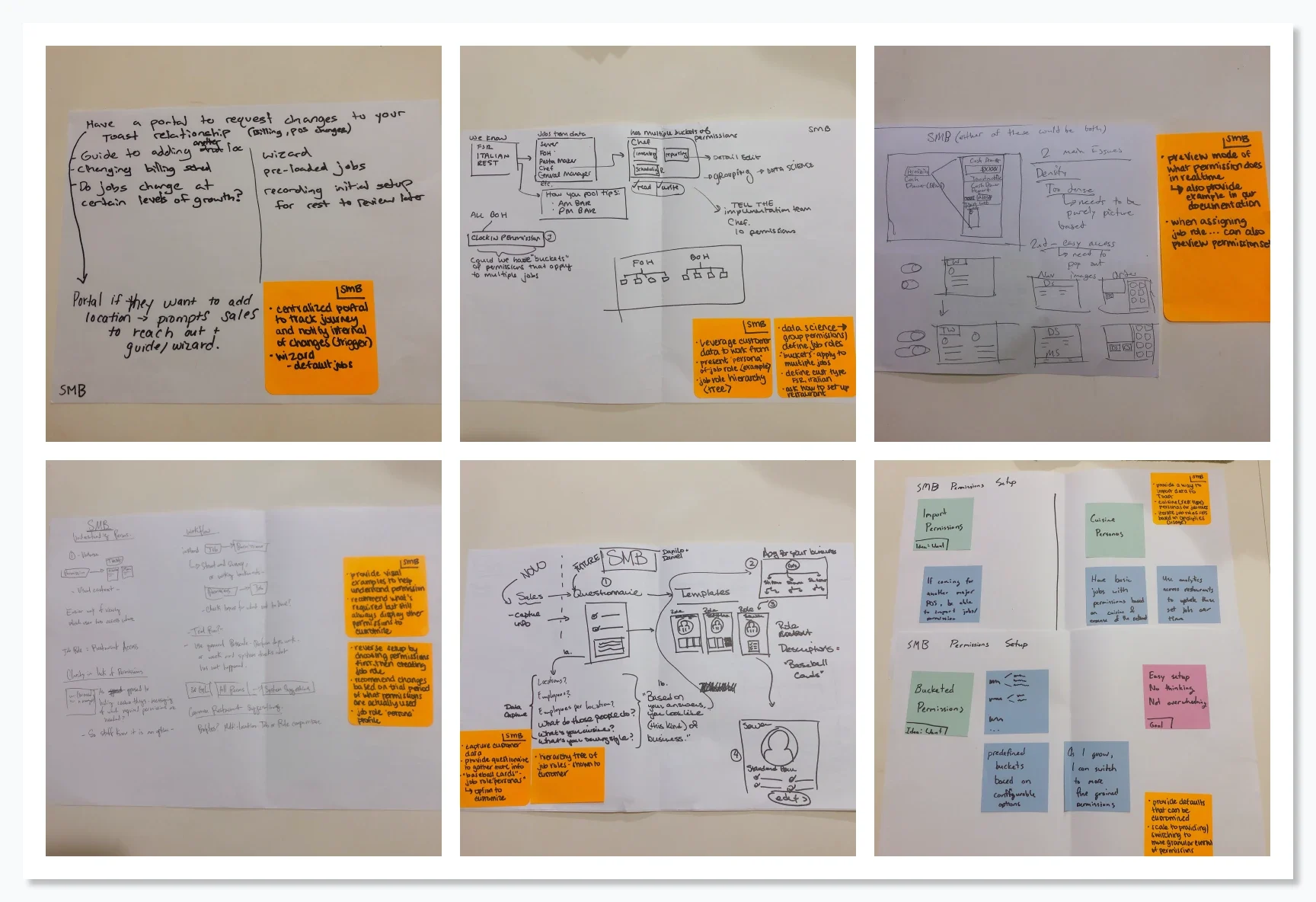
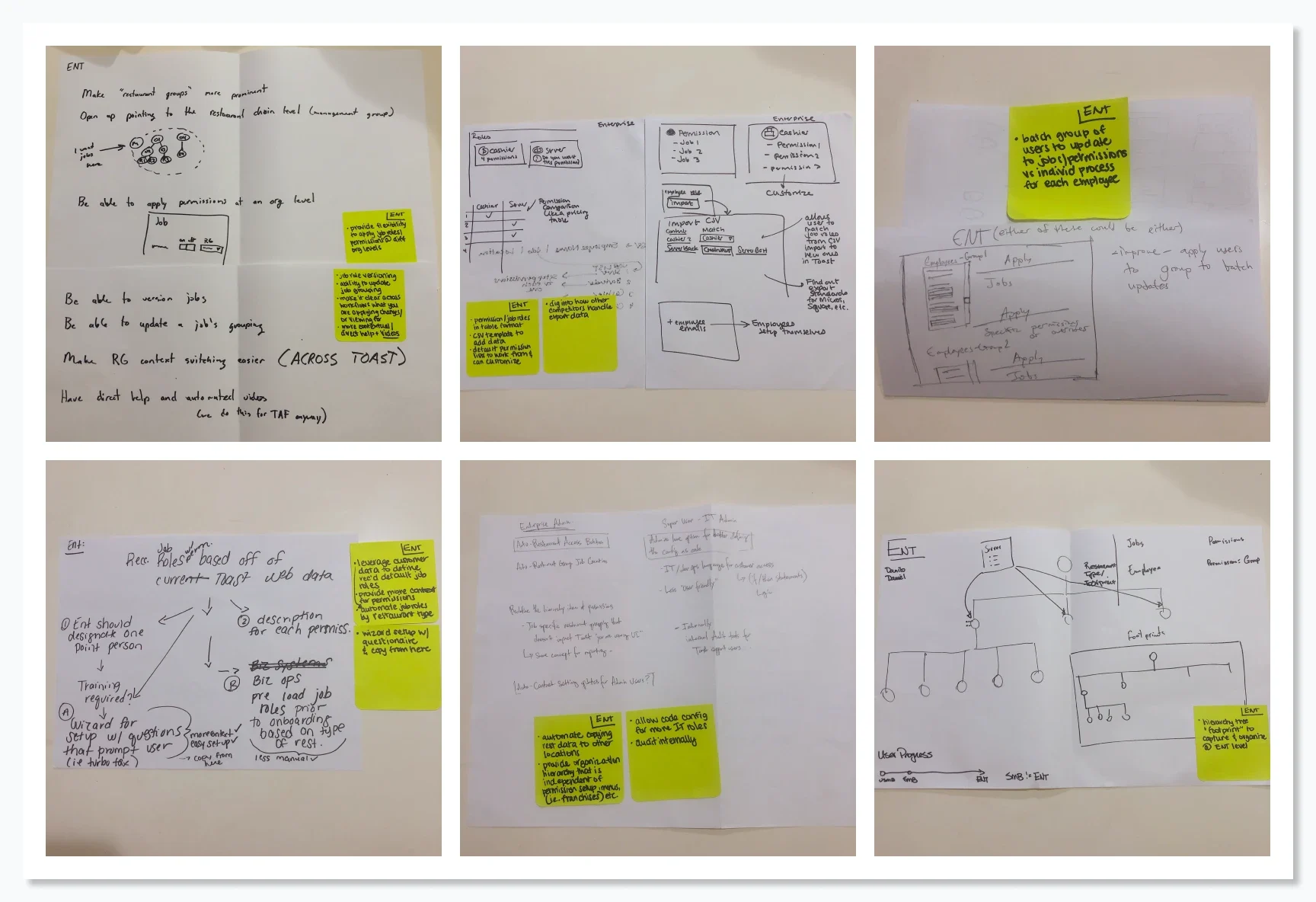
To keep the team aligned, I defined design principles and proto-personas from the customer insights. Then I ran a workshop with my product and engineering team and a few designers to turn those insights into self-service setup concepts, sketching for smaller restaurants and for enterprise customers, and clustering the ideas under the principles.
Make it easy
Workflows that are intuitive and simple to complete.
Provide context
Explain the what, how and why so customers understand.
Be adaptable
Tailor the experience to different customer needs.
Instill confidence
Empower customers to make choices they don’t second-guess.
Sketches and sticky notes exploring setup concepts for small and mid-size restaurants
Sketching setup concepts for smaller restaurants.
Sketches and sticky notes exploring organization-level concepts for enterprise customers
Sketching organization-level concepts for enterprise.

Concepts, by principle

SMB Controller
“Help me understand permissions as I set it up so it makes me comfortable to handle it on my own as we grow”
Make it easy · Smart wizard
Capture customer data and ask questions to understand how to set up the restaurant, and preview a permission set when assigning a job role.
Provide context · Profiles and preview
Cuisine profiles to work from, “baseball cards” that explain each job role’s recommended permissions, and a real-time preview of what a permission does.
Be adaptable · Leverage data
Use data on current active jobs to define permission buckets and job roles, with defaults that can be customized.
Instill confidence · Simplified control
Scale the level of control as they grow, show job roles as a hierarchy tree, and apply permission buckets to multiple jobs.
Enterprise Administrator
“Help me with setup in a way that removes duplicate work and gives me a high-level view of the setup across locations”
Make it easy · Smart wizard
A questionnaire-led wizard, an easy CSV template to add data, and automatic copying of restaurant data to other locations.
Provide context · Profiles and preview
More direct content and videos, default permission lists, and a table to view permissions and job roles across the restaurant.
Be adaptable · Leverage data
Recommend job roles by restaurant type, apply and update roles at different organizational levels, and version job roles so changes can be reverted.
Instill confidence · Simplified control
Update in batches, a separate organizational hierarchy for permissions, a corporate “footprint” tree, and code configuration with API support for IT-defined roles.

Round 3: ideas across both personas

As we kept iterating, a third round of ideation surfaced more ideas when we thought about both proto-personas together.

Other ideas that surfaced
  • A first-time-use experience for brand new customers
  • For enterprise, clearly define restaurant groups so existing data can be imported and duplicated across locations
  • Update permissions continuously based on usage, triggered internally
  • Permission sets available only for certain restaurant types
  • Building blocks for enterprise, and a wizard experience for SMB
  • Default job role profiles that can be customized at the corporate or restaurant level
  • An optional wizard to choose job roles that already exist, or copy them from another location
  • Job roles created at a restaurant, made available at the restaurant group level

Testing the concepts

From those concepts, I created a setup wizard workflow and new templates to test with customers. We synthesized their feedback to pull out the features they gravitated toward as clear wins for making setup easier.

06 · Prioritizing

Deciding what to build first.

With customer feedback in hand, and many ideas and requests, we needed a way to choose. We used customer value and uniqueness as the frame, and built a roadmap for 2020 around it.

Not unique
Unique
High customer value
High value, not unique
Most features land here
Differentiator
High value and unique
Low customer value
Waste of time
Low value, not unique
Who cares?
Low value, unique

We sorted top customer requests and pain points into four categories: not unique, unique, high customer value and low customer value, and used that to shape the MVP approach.

High customer value comes first. Because most features are high value but not unique, the plan aimed for about 20% delighters and 50% design debt.

Mapping out the work

I ran planning sessions with the product manager and the lead developer to scope the work based on customer feedback. We defined the 2020 roadmap for the team, including a permissions strategy and vision, and communicated it to stakeholders to get buy-in.

Q1Foundation
Improve the current experience of employee permission management.
Q2Foundation
Improve documentation, copy and error messaging, prevent bad behavior, and support setup.
Q2MM / ENT
Design a concept of a “corporate view” within the product.
Q3Ease of use
Iterate on the Q2 concepts, moving toward self-service.
Q3Security
Support common split-permission requests, like void and discount.
Q4MM / ENT
Release the top feature request: clock in as job role.

The permissions MVP

Goal
  • Improve the current experience so we can release new features quickly and gather real-time customer feedback, to win or fail fast
  • Keep the north star in mind: self-service setup and management of permissions
Focus area: instill confidence for growth
  • Improve the quick add pages for economies of scale
  • Edit an employee by location
  • Secure level of access
  • Clock in as your role
07 · The experience

A guided setup, from jobs to accounts.

The result was a guided setup for onboarding. It starts from the restaurant’s relationship with its group, so job roles aren’t built from scratch, then moves through adding employees, with their jobs and locations, and setting up their accounts. Every step can be skipped for now.

toastA Little Restaurant - Santa Monica
These are the jobs we listed based on your relationship with West Coast Group.
You can add or remove any job role as well as edit the job role title and permissions for your restaurant location.
Corporate
Director of OperationsCorporate
Salary | $--
24 Permissions
East Coast Group, West Coast Group
›
+Add Job
A Little Restaurant - Santa Monica
OwnerManagement
Salary | $--
21 Permissions
West Coast Group
›
General ManagerManagement
Salary | $--
18 Permissions
West Coast Group
›
Skip for nowContinue
Step 1
Start from the group
Jobs are listed based on the restaurant’s relationship with its group. Default roles can be customized at the corporate or the restaurant level, each showing its permission count and where it applies.
toastA Little Restaurant - Santa Monica
These are the jobs we listed based on your relationship with West Coast Group.
You can add or remove any job role as well as edit the job role title and permissions for your restaurant location.
Corporate
Director of OperationsCorporate
Salary | $--
24 Permissions
East Coast Group, West Coast Group
⌄
Edit Job
Job Title
Director of Operations
Pay Basis
hourly
salary
Default Pay
$
Applies to
East Coast GroupWest Coast Group
Tags
Corporate
CancelSave Changes
Step 2
Edit in place
Open a job to change its title, pay basis, default pay, which groups it applies to, and its tags, without leaving the list.
toastRestaurant Name Here
Let’s get your employees added to your restaurant with their personal info.
Enter your employee name, number, and what job(s) they have and if they work at other locations.
First Name *
Last Name *
Phone Number
Job
Applies to
First Name
Last Name
Phone Number
Job▼
A Little Restaurant - Santa M...▼
×
First Name
Last Name
Phone Number
Job▼
A Little Restaurant - Santa M...▼
×
First Name
Last Name
Phone Number
Job▼
A Little Restaurant - Santa M...▼
×
First Name
Last Name
Phone Number
Job▼
A Little Restaurant - Santa M...▼
×
First Name
Last Name
Phone Number
Job▼
A Little Restaurant - Santa M...▼
×
First Name
Last Name
Phone Number
Job▼
A Little Restaurant - Santa M...▼
×
First Name
Last Name
Phone Number
Job▼
A Little Restaurant - Santa M...▼
×
+ Add row
BackSkip for nowContinue
Step 3
Add employees with their jobs
Enter each employee’s name and number, which jobs they have, and whether they work at other locations.
toastRestaurant Name Here
Let’s get your employees set up with their account info.
This is how the employee will be able to access Toast and how to identify them for other employee reporting purposes.
Name
Passcode *
Employee ID
Email
Toast Web Access?
Employee 1
Passcode
Employee ID
Email
Employee 2
Passcode
Employee ID
Email
Employee 3
Passcode
Employee ID
Email
Employee 4
Passcode
Employee ID
Email
Employee 5
Passcode
Employee ID
Email
Employee 6
Passcode
Employee ID
Email
Employee 7
Passcode
Employee ID
Email
Employee 8
Passcode
Employee ID
Email
BackSkip for nowContinue
Step 4
Set up their accounts
Passcode, employee ID and email, plus whether they get web access. Every step can be skipped for now.
08 · Next steps

Designing the experience, and what comes next.

Our approach was to improve the current experience by tackling the individual workflows that confused customers today.

1
Easier pages
Improved specific pages so setup is easier and faster to complete.
2
Guided tours
Worked with our digital adoption manager on guided tours across workflows, to build confidence.
3
Aligned teams
Synced up early and often, so everyone stayed aligned to the vision and design components stayed current.
4
A baseline to beat
Set up a central team metrics doc with the product manager, to measure success against a baseline.

After the MVP

The next step was to shape a vision for a scalable product for enterprise customers, making permissions easier to manage from both a corporate view and a restaurant location view.

Corporate view
Manage permissions across the whole organization.
→
Restaurant location view
Manage them at the location level.
→
A scalable enterprise product
Potentially a framework for a new portal for bigger customers.
{{ fabIcon }} {{ fabLabel }}