Selected Work

This work is protected.

Enter the password,
or ask Alice for one.

Your access has expired. Email Alice for an updated password.
Incorrect password. Try again.
Boulevard · Marketing Platform Building marketing into the platform, all in one place
Boulevard · Marketing PlatformBoulevard More case studies →
Boulevard · Marketing platform0 TO 1

Building marketing into the platform,
all in one place.

Boulevard didn't have a built-in marketing platform. I led design for the first version, studying how tools like HubSpot, Mailchimp, and Customer.io run campaigns to shape how salons and spas create, send, and measure them.

Role
Lead designer, working with a product manager, engineers, the CTO, and our CEO at key moments.
Outcome
Beta feedback was positive, and customer success wanted it for customers beyond the beta, including enterprise clients.
AAbundant SalonBeverly Hills
⚲
Front DeskCalendarMessages3SalesClientsReportsMarketingManage
14JM
Campaigns
Locations: Beverly Hills ⌄
Jan 1 – Jan 30, 2021Create campaign
Messages senti
402
254 emails | 148 SMS
33%
Engagementsi
128
of 387 delivered
9%
Bookedi
95 appts.
of all appointments
4%
Total salesi
$1,080.00
of all sales
Campaign
Status
Launched
Sent
Opened
Engaged
Sales
Fill slow days
Live
Jan 12, 2021
402
96% delivered
252
2 unsubscribes
39
10% click rate
$640.00
3 appointments
Last minute opening
Live
Jan 01, 2021
386
95% delivered
162
5 unsubscribes
18
11% tap rate
$260.00
2 appointments
Birthday offer
Live
Nov 30, 2020
42
100% delivered
24
0 unsubscribes
4
16% tap rate
$0.00
0 appointments
Membership
Live
Nov 30, 2020
24
100% delivered
18
0 unsubscribes
2
11% tap rate
$0.00
0 appointments
Rescue lost clients
Paused
Nov 30, 2020
78
99% delivered
34
3 unsubscribes
8
24% tap rate
$180.00
1 appointment
Reminder to book
Draft
Nov 30, 2020
–
–
–
–
01 · The opportunity

Customers didn't want to pay for yet another tool.

Salon and spa owners were running their campaigns in separate tools like Mailchimp and HubSpot, and paying for each one. One of the most common requests we heard was to bring marketing into Boulevard, so they no longer had to maintain campaigns somewhere else.

The reason was simple: those tools were too expensive to stack on top of everything else they already paid for, and owners wanted it all in one place.

02 · What I owned

Leading design for the first version.

I was the lead designer on the team, working closely with our product manager, engineers, and CTO. Our CEO was heavily involved at key moments to help set direction.

03 · Research

Learning from customers, and from the platforms they already knew.

I combined customer research with competitive analysis, so the first version reflected what salon and spa owners needed, not just what other tools offered.

We drew on insight from customers and prospects, noting which metrics mattered most for judging their marketing performance.

Deep dive on other spa and wellness platforms (Mindbody, Millennium) and on marketing platforms (Mailchimp, HubSpot, Customer.io).

Team brainstorms to settle what was technically feasible and fit the timeline, without losing sight of what customers needed most.

“The more tracking there is the better… I need to trust the numbers.”
Customer research

I studied how platforms like HubSpot and Mailchimp run and manage campaigns, and used that parallel and competitive research to shape the first version of the experience.

For HubSpot, Mailchimp, and Customer.io, I dug into how each one is set up and managed day to day, the types of campaigns it offers, and what the experience feels like to use. That showed me what a mature campaign tool needs, and what a salon or spa owner could skip in a first version.

04 · The problem

One product had to work for a single salon and for a franchise.

Boulevard serves everyone from single-location studios to multi-location groups and franchises. That made campaigns more than a messaging problem: who can create them, and whose results they see, had to work at both the business level and the location level.
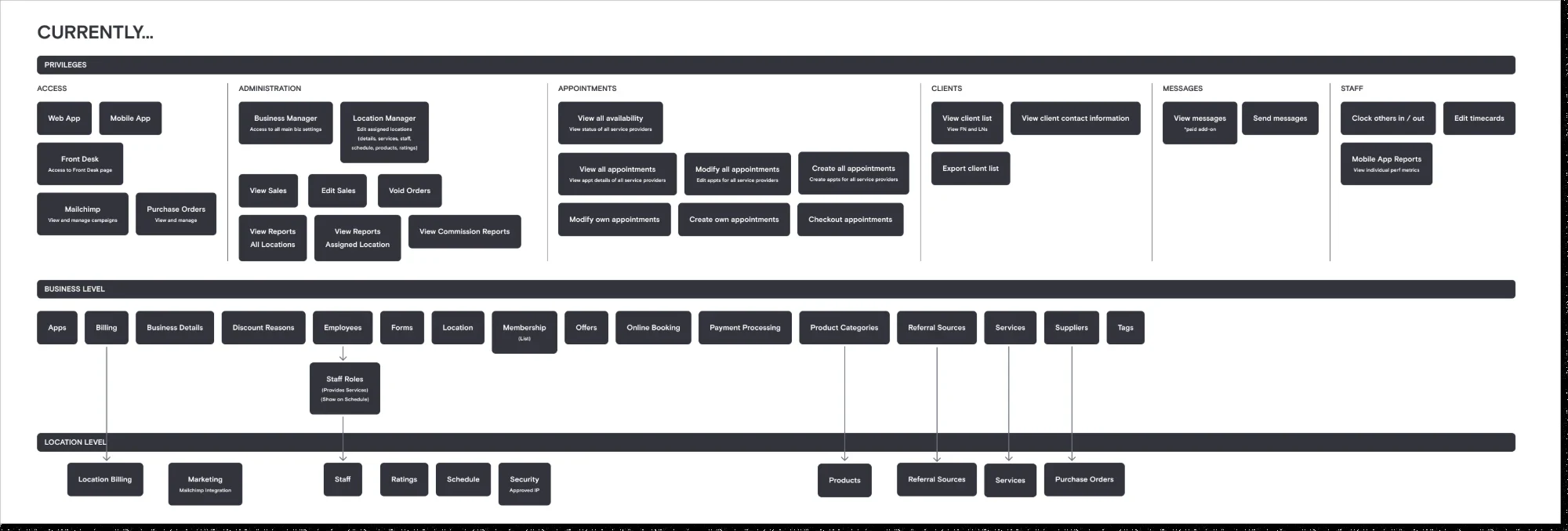
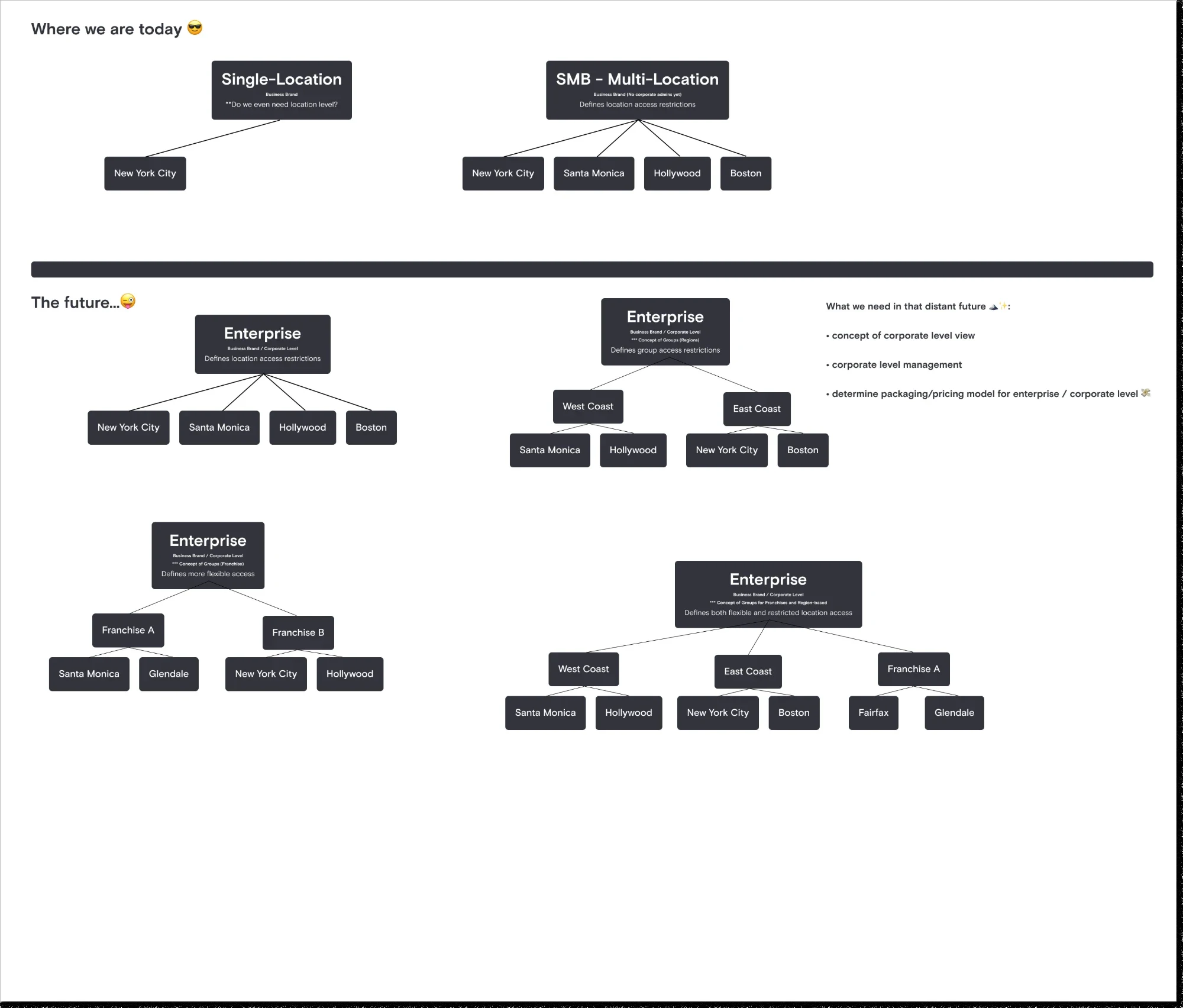
Diagram of the current structure: privileges, business-level settings and location-level settings
Where we started: how privileges, business-level settings and location-level settings fit together today.
Corporate-owned group
Each location has its own manager
Business setting: some control
Who pays
Corporate
The business
Creates branded templates, assigns locations to campaigns, sees performance across all of them
Locations can
Turn provided campaigns on or off, set up and edit their own
What they wanted
Roll-up oversight, while locations keep the autonomy to set up and manage campaigns
Franchise brand
Franchisees own their locations
Business setting: some control
Who pays
Franchisees
The business
Sets up and edits campaigns, sees performance across all locations
Locations can
Set up, edit, and turn campaigns on or off, and see their own location's performance only
What they wanted
Full autonomy for franchisees, with performance kept private to each location
Partner-owned multi-location
Partners own several locations
Business setting: full control
Who pays
Partners
The business
Partners are admins who set up and edit all campaigns
Location managers
No access to marketing
What they wanted
Marketing managed by partners, not by location managers
Three kinds of enterprise account shaped the permissions model, each with a different answer to who pays, who controls campaigns, and what a location can see.
Diagrams of today's single-location and multi-location accounts, and four future enterprise structures: flat, region groups, franchise groups and a hybrid
From single-location and SMB multi-location today to four enterprise structures: flat, regional, franchise, and a hybrid.
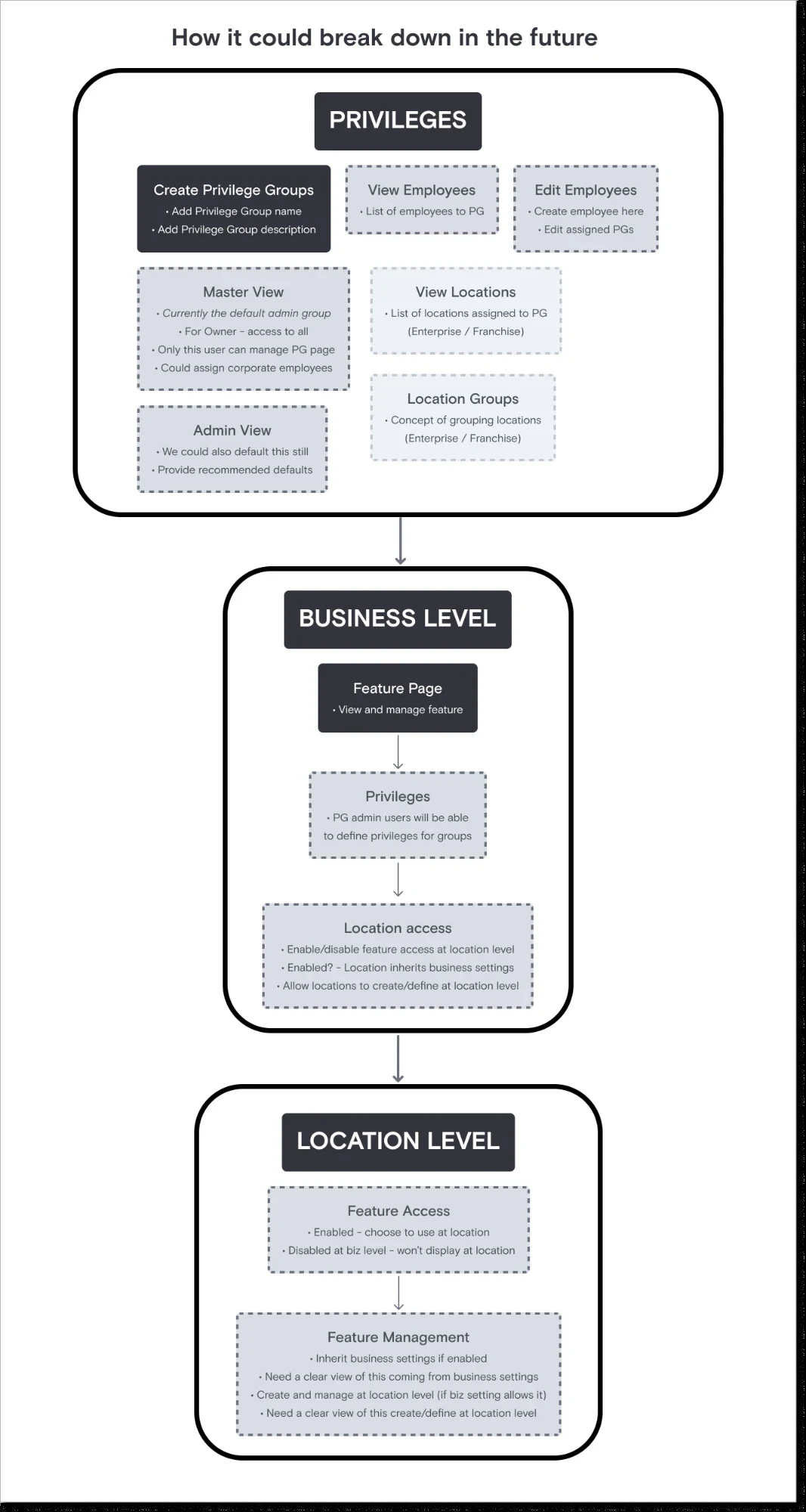
Diagram of how privileges, business-level and location-level feature settings could break down in the future
The future model: privilege groups define who can do what, business-level settings set the defaults, and each location inherits or overrides them.
05 · Strategy

Decide where to start, then sequence the rest.

Starting a marketing platform from scratch meant deciding what to build first, and in what order. I worked with key users and the customer success team to turn their conversations and requests into the work, then sequenced it out.

We assessed SMS and more pipeline-style campaign building, but launched with email campaigns to start. We prioritized automated campaigns so businesses could set a goal, such as filling slow days or winning back lost clients, and get back to running their day-to-day and their services.

Right after launching to general availability, we moved on to planning SMS campaign setup.

Phase 1
Phase 2
Phase 3
Later
Marketing campaigns
Slow day
Reminder
Rescue
New Client
New Member
Scheduled campaigns
Navigation
New Campaigns entry
Premier and Enterprise
Ratings
Referrals
Offers
Transactional emails
Permissions
Define permissions for campaigns
Define permissions for scheduled campaigns
Phased delivery across three workstreams: marketing campaigns, navigation, and permissions.
Phase 1
Slow day campaign
Fill open spots based on % of calendar filled
Send when calendar is a set % full
Send email a set number of days from today
Can be made service-provider specific
Send follow-up email and add an offer
Send follow-up email a set number of days later
Phase 1
Reminder campaign
Fill open spots by sending a reminder some days after the last appointment
Send a set number of days after the client's last appointment
Send follow-up email and add an offer
Send follow-up email a set number of days later
Phase 1
Rescue campaign
Rescue a client by sending an email some months since their last appointment
Send email a set number of months after the last appointment
Send follow-up email and add an offer
Send follow-up email a set number of days later
Phase 2
New Client campaign
Send an email to book again some days after the first appointment
Send a set number of days after the client's first appointment
Phase 2
New Member campaign
Send an email some days after a membership purchase, to book
Send a set number of days after the client's membership purchase
Phase 3
Scheduled campaigns
Customize messaging to send out to clients by a scheduled date
To be defined
Each campaign type has a trigger and optional follow-ups: Slow day, Reminder and Rescue in phase 1, New Client and New Member in phase 2, Scheduled in phase 3.

Defaults first, then full customization

For beta, we led with default templates. Businesses changed only the content, the copy, and chose from a default gallery of images. That let us move quickly and get something into users’ hands to test.

Then I worked with engineering on a second round: letting businesses customize the entire campaign, including its styling and their own images, so they could build it however they wanted. That shipped for GA, as the follow-up after beta.

Beta
Default templates
  • Edit the copy
  • Choose from a default gallery of images
  • Move fast, and learn from real use
GA
Full customization
  • Style the entire campaign
  • Add your own images
  • Build it however you want
06 · The experience

Pick a goal, set it up, see what it earned.

Owners choose a goal, set up when it should send and what follows up, then watch results come back: messages sent, opened, engaged, booked, and revenue. Customers had told us they needed to trust the numbers, so the results are on the same screen as the campaigns themselves.

Setting up a campaign, in three steps

Step 1
Set the trigger
Choose when the campaign goes out. For Fill slow days, that’s when a staff member’s day has more than a set percentage of availability. Clients without an appointment are messaged two weeks before the open spot.
AAbundant SalonBeverly Hills
⚲
Front DeskCalendarMessages3SalesClientsReportsMarketingManage
14JM
Marketing
‹  Summary
General SettingsPreview Message
● Paused     ⋮
Fill slow days
Manage your campaign settings
When do you want your campaign to be sent out?
If a staff member has a day on the calendar with more than 50% availability.
We’ll automatically message clients without an appointment 2 weeks before this available spot.
Save changes
Your campaign is now paused.
Step 2
Preview the message
See the email the way clients will, with the subject line, sender and reply-to address, before moving on. A test email can be sent first. In beta, businesses edited the copy and chose from a default image gallery; full customization followed for GA.
AAbundant SalonBeverly Hills
⚲
Front DeskCalendarMessages3SalesClientsReportsMarketingManage
14JM
Marketing
‹  Select a campaign
General Settings
2Preview Message
3Launch
Fill slow days
Email subject line:
It’s been a while and we’d love to see you
Sender name:
Abundant Salon <abundantsalon@blvd.main>
Clients can reply to: main@abundantsalon.com
ABUNDANTSALON
BOOK NOW
Only a few appointments left!
Hi {firstname}.

We noticed you haven’t visited us in a bit and we miss you! We have a few appointments available and would love to see you. Give us a call or schedule an appointment with us online below.

Can’t wait to pamper you soon!
Book your next appointment
Step 3
Launch, or start later
A final step confirms the setup is complete. Launch it now, or choose to start it later. Once it’s running, a campaign can be paused from its summary.
AAbundant SalonBeverly Hills
⚲
Front DeskCalendarMessages3SalesClientsReportsMarketingManage
14JM
Marketing
‹  Select a campaign
General Settings
Preview Message
3Launch
Let’s do this!
Launch your campaign
You have completed setting up your campaign. The last step is to launch the campaign and watch your business grow!
Launch campaign
No thanks, I’ll start it later
First-time experience for owners
Rollout, phase 1
1Marketing tab
Only campaigns for now
Only owners can view the tab and create an automated campaign. A guided tour encourages them to set permissions for privilege groups.
2Campaigns
Empty state
Analytics and the campaign list start empty, with a clear way to create the first campaign.
3Create new campaign
Basic setup
Choose an automated campaign type and when it should send. Depending on the type, follow up with an offer.
4After emails send
Results
Analytics start filling in under performance, so owners can see what each campaign did.
For everyone else: we decided whether to hide the Marketing tab, or show it with a message telling the admin to set up privileges.
Client communication preferences
All clients, phase 1
1In the email
Hyperlinks
Clients who receive emails from a business can update their communication preferences, with an unsubscribe link.
2Until the client portal works
Orphan page
A standalone page where clients manage their preferences.
3Orphan page states
What it shows
Email settings by type (marketing, reminders, transactional) and an option to unsubscribe from all.
Scheduled campaigns
Later phase
1Marketing tab
Update
Owners and users with access get a notice and a guided tour of the new features.
2Campaigns
Analytics
The list and analytics cover both automated and scheduled campaigns.
3Create new campaign
Choose a type
Pick automated or scheduled.
4Scheduled setup
Customize and time
Customize the messaging and choose when to send it out.
How the first release would roll out to owners and clients, and how scheduled campaigns would join later.
07 · Outcome & reflection

What shipped, and what I learned.

Beta feedback was positive. The customer success team asked for it for customers beyond the beta users too, including enterprise clients.

We then opened it up from beta to general availability, with SMS campaign setup planned as the next step. I moved on from the company around that point, so this story ends at launch.

What I would do differently

Be firmer about direction. There were moments when we weren't sure which way to go, with several strong voices shaping priorities. I'd push earlier to get everyone focused on releasing what we had, then building the next thing quickly after.

08 · What's next

A starting point, with the next options already on the table.

The campaign picker was designed to grow. We started with automated email campaigns, beginning with Fill slow days, and the other options on this screen were what we sequenced next, alongside SMS campaign setup.

Each one answers the same request we kept hearing from customers: run all of their marketing in one place.

Select a campaign
Reach out to your clients and keep them coming back with one of the campaigns below.
⟳ RECURRINGLaunched first
Fill slow days
Promote days where your calendar has open appointments to keep schedules stacked.
Select campaign
⟳ RECURRINGUp next
Reminder to book
Send a friendly reminder to clients who don’t have a future appointment on the calendar.
Select campaign
⟳ RECURRINGUp next
Last minute opening
Give clients first dibs when your calendar has a last minute opening.
Select campaign
⟳ RECURRINGUp next
S.O.S
Rescue lost clients
Win them back with a reminder that they’re missed.
Select campaign
The campaign picker, designed to grow: Fill slow days first, with the other options sequenced next. Birthday, membership and general announcement campaigns were lined up too.

The dashboard had room to grow, too.

The first release kept to four measures: messages sent, engagements, appointments booked, and sales. Customers had told us they needed to trust the numbers, so we started with a few they could rely on. These were the next measures we looked at adding.

Open rate
53%
how many clients read it
Unsubscribe rate
1.1%
a signal for over-emailing
Booked from campaigns
6 appts.
bookings tied to a campaign
Avg. booking value
$180.00
what each booking earned

Figures shown are illustrative demo data.

{{ fabIcon }} {{ fabLabel }}